
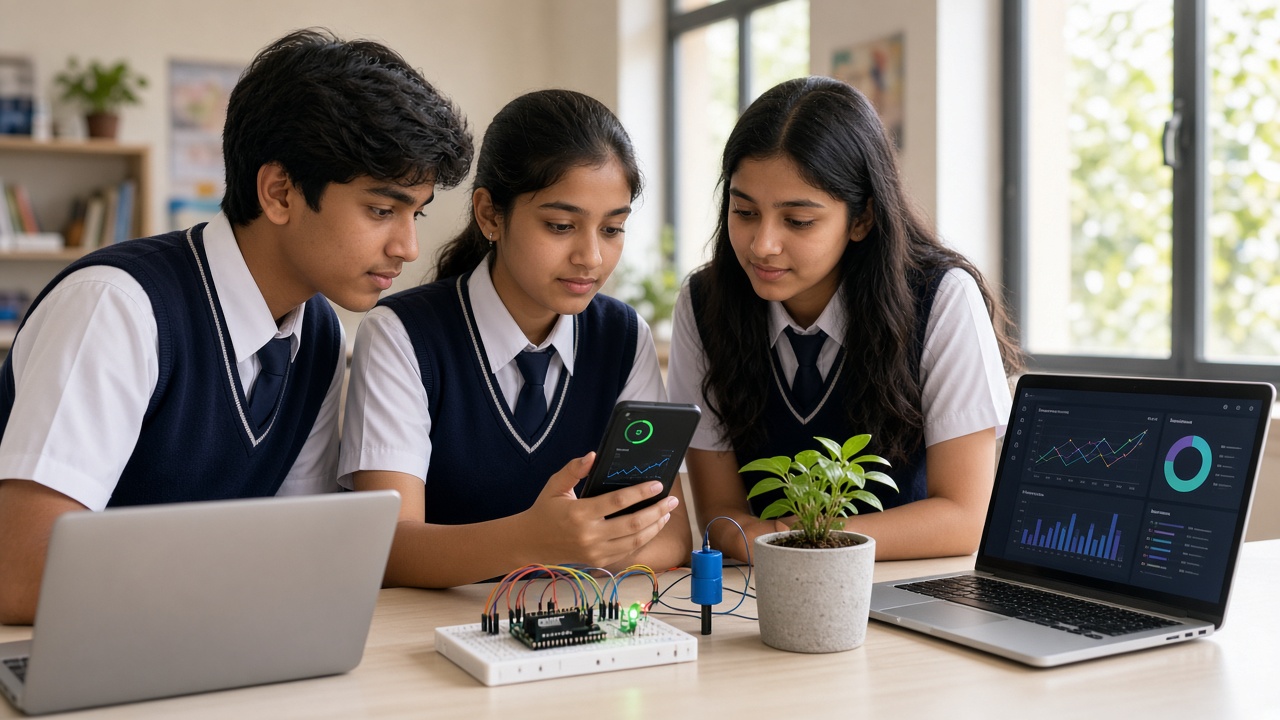
Sense, share, decide and act—IoT turns everyday objects into smart helpers, and students can start building them in school
A beginner-friendly guide for Indian school students on the Internet of Things—what it is, everyday examples, how it works, project ideas by class and what to learn first.
Introduction
You may have heard the phrase “Internet of Things,” or IoT, and wondered whether it is just another buzzword. It is not. IoT describes everyday objects that can sense what is happening around them, share that information over a network and sometimes act on it automatically.
This beginner’s guide is for students from roughly Class 6 to 12, and for parents and teachers who support them. It explains what IoT means, where it appears in Indian life, how it works, how it links to coding, robotics and AI, and which projects and skills make a good start.
What IoT means in plain language
The Internet of Things is a network of physical “things” that carry sensors, a small computer and a way to communicate. A normal fan only spins. An IoT fan can measure room temperature, send that reading to a phone and change speed on its own when the room gets warm.
The core idea is simple: sense, share, decide and act. The object collects data, sends it somewhere useful, a program decides what it means, and then something happens—an alert, a motor turning or a light switching on.
Everyday examples of IoT in India
Smart meters. Many electricity distribution companies in India are installing smart meters that send readings remotely instead of waiting for a meter reader.
Home automation. Smart plugs, bulbs and voice assistants let people control appliances from a phone. A water-level sensor on a rooftop tank can warn the family before it overflows.
Farm soil-moisture sensors. On some farms, sensors in the soil measure how wet it is and send readings to the farmer’s phone, so the pump runs only when the crop needs water.
Traffic. Some Indian cities use cameras and sensors at junctions to observe traffic, and smart city projects explore adjusting signals using that data.
Health wearables. Fitness bands and smartwatches count steps and estimate heart rate, then sync with a phone. They help build habits but do not replace a doctor’s advice.
How an IoT system works, step by step
Sensors are the eyes and ears. They measure temperature, light, motion, distance or soil moisture and turn it into electrical signals.
A microcontroller is the small brain that reads those signals and runs your program. Students often start with an Arduino board. The ESP32 is a popular next step because it has built-in Wi-Fi and Bluetooth.
Connectivity carries the data, through Wi-Fi, Bluetooth or a mobile network. The cloud or an app stores and displays it, often as simple graphs on a dashboard. Actions close the loop: based on rules in your code, the system might sound a buzzer, send a notification or run a small pump.
How IoT connects to coding, robotics and AI
Coding is how you tell the microcontroller what to do—read a sensor, check a condition with an “if” statement and send data. Robotics uses many of the same parts: sensors, motors and microcontrollers.
AI adds another layer. Once a system collects plenty of data, machine learning can look for patterns, such as predicting when a plant will need water from past readings.
Beginner IoT project ideas by class level
Classes 6–8. Learn sensing and action before adding the internet. Build an automatic night lamp with a light sensor, a temperature alarm with a buzzer, or a plant reminder that blinks an LED when the soil is dry.
Classes 9–10. Add connectivity. Use an ESP32 to send room temperature and humidity to a phone dashboard, or build a water-tank monitor that sends an alert. This is a good time to move from blocks to Arduino-style code.
Classes 11–12. Combine IoT with data. Build a weather station that logs readings to a spreadsheet, a smart irrigation model, or an air-quality monitor for your school. Analyse the data in Python and present your findings at a science exhibition.
Staying safe: privacy and security basics
Connected devices collect information, so handle it carefully. Never put Wi-Fi passwords in code you share online, change default device passwords, and do not point cameras or microphones at people without permission. Collect only the data your project really needs.
Electrical safety matters too. Beginner projects should run on batteries or USB power, and nothing should be connected to mains electricity without a qualified adult supervising. Parents and teachers can check what data a project collects.
What to learn first, and in what order
Start with basic electronics: voltage, current, breadboards, LEDs, resistors and buttons. Next, learn coding fundamentals—variables, loops and conditions—through block-based tools or simple Arduino programs. Then explore sensors and actuators one at a time until you can use each confidently.
After that, learn networking with an ESP32: connecting to Wi-Fi, sending data and viewing it on a dashboard. Finally, move into data handling with Python and, when ready, introductory machine learning. Frameworks such as NEP 2020 encourage coding and experiential learning, and IoT projects are one practical way to bring those ideas into class.
Frequently asked questions
Q: Do I need to be good at maths to learn IoT? A: Basic arithmetic and logic are enough to begin. Ideas such as averages and graphs become clearer as you build, so curiosity matters more than top marks.
Q: Is Arduino or ESP32 better for beginners? A: Arduino is often easier for first experiments because of its many beginner tutorials. ESP32 is a strong next step when you want Wi-Fi or Bluetooth, and much of the code feels similar.
Q: Can I learn IoT without expensive kits? A: Yes. Free online simulators let you build and test virtual circuits, and a basic starter kit with a board, breadboard and a few sensors covers many early projects.
Q: Is IoT a good career path? A: IoT skills connect to electronics, embedded systems, software, data science and agriculture technology. Even in other careers, the problem-solving and hands-on skills stay useful.
Start building IoT projects with SheepByte
SheepByte is an AI and robotics education company based in Udaipur, Rajasthan. Our programs—AI Learning, Coding Bootcamp, Drone Technology, Innovation Club, Robotics Lab and STEM Integration—help students move from first circuits to connected, data-driven projects. We run workshops in Jaipur, Delhi and online, and help schools set up robotics labs where IoT projects can grow.
To explore programs for your child, class or school, email support@sheepbyte.com or visit sheepbyte.com.


