
How cameras and AI turn pixels into meaning, explained simply for students, parents and teachers
A beginner-friendly guide to computer vision for school students: how images become numbers, the difference between image classification, object detection and face recognition, everyday examples, hands-on activities and the ethics of teaching machines to see.
Introduction
When you unlock a phone with your face or scan a QR code at a shop, a computer is "looking" at an image and making sense of it. That ability is called computer vision. This guide explains how it works in plain English for students, parents and teachers, with examples, activities and the ethical questions every young builder should ask.
What is computer vision?
Computer vision is a branch of artificial intelligence that teaches computers to understand images and video. A camera captures the picture, and software works out what is in it, where it is and sometimes what it is doing.
We glance at a street and instantly see a cow, an auto-rickshaw and a red signal. A computer has to learn each of these from examples, which is why computer vision is closely linked to machine learning.
How a computer sees a photo: pixels and numbers
Zoom far into any digital photo and you will see tiny squares called pixels. A photo that is 1920 pixels wide and 1080 pixels tall contains about two million of them.
Each pixel is stored as numbers. In a black-and-white image, one number shows how bright the pixel is, often from 0 for black to 255 for white. Colour images commonly use three numbers per pixel, for red, green and blue. So to a computer, a selfie is really a huge table of numbers.
Computer vision is the job of finding meaningful patterns in that table. Early layers of a modern vision model tend to pick up simple features such as edges and corners; later layers combine them into shapes, textures and whole objects.
Three common tasks: classification, detection and face recognition
Image classification answers "What is in this picture?" with one label, such as "healthy leaf" or "diseased leaf". It does not say where the object is.
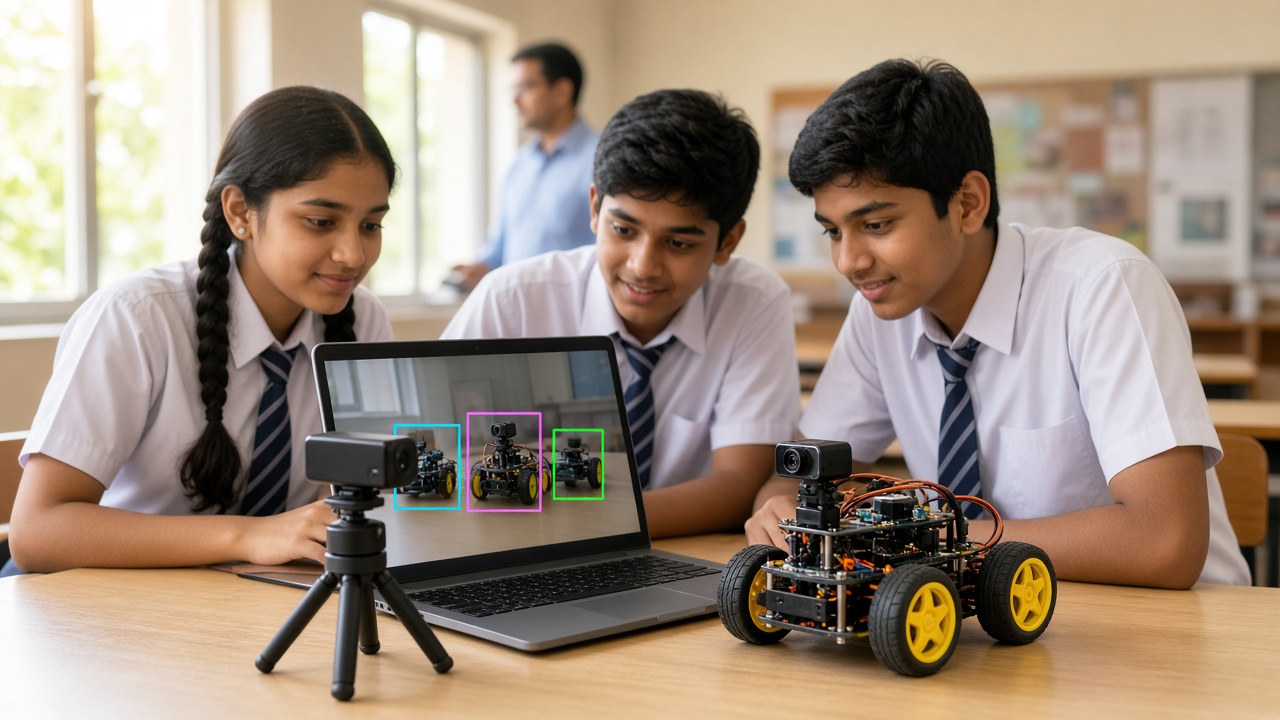
Object detection answers "What is here, and where?" It draws boxes around each object it finds, for example every bicycle and person in a street scene.
Face recognition goes further and tries to match a face to a specific person's identity. This is different from face detection, which only finds that a face is present, as a phone camera does when it focuses on faces. Because a face is personal and hard to change, recognition systems raise serious privacy questions. Collecting or using someone's face data should always require their informed consent, and for children, a parent's or guardian's permission as well. India's Digital Personal Data Protection Act, 2023 sets rules for handling personal data, so schools should check current guidance before any project stores students' faces.
Where you already see computer vision
Phone cameras: Many phones detect faces to set focus, blur the background in portrait mode and let you search for text inside photos.
QR codes and UPI payments: When you scan a shop's QR code, the camera finds the square pattern, corrects for angle and reads the information inside. This is a simpler, rule-based kind of computer vision.
Traffic cameras: Some cities use cameras to monitor traffic flow, and some systems can read vehicle number plates automatically.
Farming apps: Several apps let farmers photograph a leaf and get a suggestion about a possible crop disease. These can help, but can also be wrong, so expert advice still matters.
Beginner activities students can try
No-code image classifier (around Class 5 and up, with a teacher): Free browser-based tools such as Google's Teachable Machine let students train a model using a webcam. Collect 30 to 50 photos each of two classes, say "pen" and "pencil", train, and test it live. Then change the lighting or background and see when it fails. Follow your school's rules on webcam use and avoid recording classmates' faces without permission.
Camera-based line follower (Class 8 and up): Many beginner robots follow a black line using infrared sensors. A camera version looks at the image of the floor, finds which side the dark line is on and steers towards it.
Python and OpenCV (Class 9 and up): OpenCV is a free, open-source computer vision library. After installing it with pip install opencv-python, students can load an image, convert it to grayscale, detect edges and read frames from a webcam in just a few lines of code. A good first project is tracking a red ball across the screen.
How computer vision connects to robotics and drones
Sensors such as ultrasonic and infrared give a robot simple readings like distance. A camera gives far richer information, letting robots sort objects by colour, read printed markers and spot obstacles.
Drones use vision too. Some use downward cameras to hold their position, some help avoid obstacles, and others are used to photograph fields or survey sites. Any school drone flight must follow current drone rules and safety guidance.
Ethics and bias: questions every young builder should ask
A vision model only knows what it was trained on. If a model sees photos taken mostly in bright light, it may fail in a dim classroom. If a face dataset lacks variety in skin tones, ages or clothing, the system can work worse for some people than others. This is called bias, and it can be unfair or even harmful.
Students can explore this directly: train a classifier, test it with different backgrounds and lighting, and record where it fails. Ask who collected the images, whether people agreed and who could be harmed if the system is wrong. These questions matter as much as the code.
Frequently asked questions
Q: Is computer vision the same as AI? A: It is one part of AI. Other parts deal with language, sound, planning and more.
Q: Do students need an expensive computer? A: No. A basic laptop with a webcam is enough for browser tools and beginner OpenCV projects.
Q: Can a computer vision model make mistakes? A: Yes. Treat its output as a guess with a level of confidence, not as a fact.
Learn computer vision hands-on with SheepByte
SheepByte is an AI and robotics education company based in Udaipur, Rajasthan. Our AI Learning program introduces students to ideas like training image models and thinking about fairness and privacy, and our Robotics Lab program helps them build robots that use sensors to react to the world. We also run Coding Bootcamp, Drone Technology, Innovation Club and STEM Integration programs, offer workshops in Jaipur, Delhi and online, and help schools set up robotics labs.
If you want to bring computer vision projects to your school or child, write to support@sheepbyte.com or visit sheepbyte.com.


