
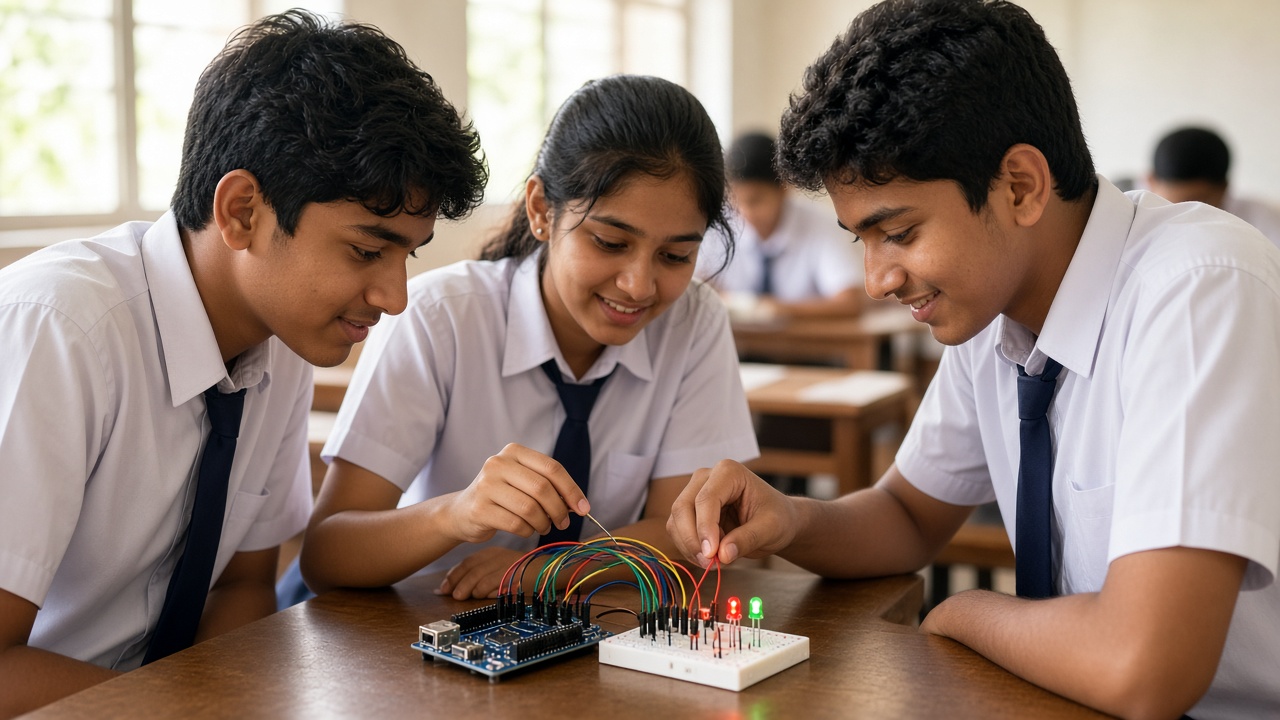
Washing machines, TV remotes and robot kits: a plain-language look at the tiny computers hidden inside everyday gadgets, for students in Classes 6 to 12
A beginner-friendly guide to microcontrollers for Indian school students, parents and teachers: what a microcontroller is, its main parts such as the CPU, memory and input/output pins, how it differs from a microprocessor and a computer, everyday examples in washing machines, remote controls, toys and microwaves, how it runs a program in a read-decide-act loop, popular student boards such as Arduino Uno, BBC micro:bit, ESP32 and Raspberry Pi Pico, why a Raspberry Pi is a single-board computer instead, a first blink-an-LED and night lamp project, safety tips with electronics, a human microcontroller classroom activity and FAQs.
Introduction
Press a button on your TV remote and the channel changes. Set a washing machine to quick wash and it fills, spins and drains on its own. Both rely on a small chip called a microcontroller. Students use the same kind of chip to build robots. This guide is for students in Classes 6 to 12 and the parents and teachers helping them.
What is a microcontroller?
A microcontroller is a tiny computer built onto a single chip. It can read signals from buttons and sensors, run a program stored inside it, and control things like lights, motors and buzzers.
It has no screen or keyboard and is not built for games or browsing. It does one job reliably while using very little power.
The main parts inside a microcontroller
CPU: the processor reads the program one instruction at a time and carries it out.
Memory: flash memory stores your program, and it stays there even when the power is switched off. A small amount of RAM holds temporary values while the program runs.
Input/output pins: these are the metal legs or connection points that link the chip to the outside world. Input pins read things like a button press or a light sensor. Output pins switch on LEDs, buzzers or, through a driver circuit, motors.
Microcontroller vs microprocessor vs computer
A microprocessor is just the processor. To work, it needs separate memory chips, storage and other parts around it. Laptops and phones use powerful processors of this kind.
A microcontroller packs the processor, memory and input/output into one chip. It is slower and simpler, but it is cheap, small and power-saving, which is perfect for controlling a single device.
A computer, like your laptop, runs an operating system and many programs at once. A microcontroller usually runs one program, with no operating system at all.
Microcontrollers you already use
Washing machines: the chip reads the program you choose, opens the water valve, runs the motor and times each stage.
Remote controls: when you press a key, a microcontroller sends a coded pattern of infrared light flashes to the TV.
Toys: talking dolls, remote-control cars and light-up games respond to buttons and sensors this way.
Microwaves: the keypad, timer, display and beeps are all handled by a microcontroller.
How a microcontroller runs a program
Most microcontroller programs follow a simple loop that repeats very quickly. First, read the inputs: is the button pressed, how bright is the room? Second, decide: compare the readings with the rules in the program. Third, act: turn an LED on or off, beep, or move a motor. Then go back to the start.
On an Arduino board, this idea is built into every program. A part called setup() runs once when the board powers on, and a part called loop() repeats forever.
Popular boards for students
Students usually learn on a development board: a microcontroller on a small circuit board with a USB port and easy-to-use pins.
Arduino Uno: a classic choice for school robotics labs, programmed in a language based on C and C++ using the free Arduino IDE. Our post at sheepbyte.com/blog/python-vs-arduino-beginner-student compares it with Python.
BBC micro:bit: a pocket-sized board with an LED grid, buttons and built-in sensors, programmed with blocks or Python in a web browser. Read more at sheepbyte.com/blog/what-is-bbc-microbit-beginners-guide-school-students-india.
ESP32: a board with built-in Wi-Fi and Bluetooth, popular for Internet of Things projects.
Raspberry Pi Pico: a small, low-cost board that can be programmed in MicroPython or C/C++.
One common mix-up: a regular Raspberry Pi is a single-board computer, not a microcontroller. It runs a full operating system and works much like a small desktop computer.
Your first project: blink an LED, then build a night lamp
Blinking an LED is the hello world of electronics. Connect an LED and a resistor to an output pin, then write a loop: turn the LED on, wait one second, turn it off, wait one second. The resistor limits current so the LED does not burn out.
Next, add a light sensor called an LDR. Read its value in the loop, and if the room is dark, switch the LED on; if it is bright, switch it off. You have just built an automatic night lamp using the same read-decide-act idea found in real products. If wiring is new to you, start with sheepbyte.com/blog/basic-electronics-for-school-students-guide-india.
Safety tips with electronics
Stick to low-voltage power such as USB or small battery packs. Never connect a project to mains wiring.
Unplug the board before changing wires, and check connections before powering on. Joining the power and ground pins directly can damage the board or the computer's USB port.
Use a resistor with every LED, handle lithium batteries carefully and stop if anything gets hot or smells of burning. Soldering should only be done with an adult or teacher supervising.
Classroom activity: the human microcontroller
One student plays the microcontroller and holds a written program: if the sensor shows dark, raise the green flag; if bright, lower it. Another student is the sensor and shows a card saying dark or bright. A third is the LED with the flag.
Run the loop a few times, then change the program so the LED blinks twice when it gets dark. Finish by asking the class to name a real gadget that works the same way.
Frequently asked questions
Q: Do I need to know coding before using a microcontroller? A: No. Block-based editors for the micro:bit and Arduino-style boards let beginners start without typing code.
Q: Which board should a beginner buy first? A: For Classes 6 to 8, the micro:bit is very friendly because so much is built in. For robotics, an Arduino Uno is a common start, and ESP32 suits connected projects.
Q: Are microcontrollers part of the school syllabus? A: India's National Education Policy 2020 encourages hands-on, experiential learning, and many schools now run robotics and tinkering activities. What is covered varies by board and school, so check with your school or the official board website for current information.
Build real projects with SheepByte
SheepByte is an AI and robotics education company based in Udaipur, Rajasthan, working with schools and students. Our programmes include AI Learning, Coding Bootcamp, Drone Technology, Innovation Club, Robotics Lab and STEM Integration, all built around making real projects. We also set up robotics labs in schools and run workshops in Jaipur, Delhi and online.
To bring hands-on microcontroller and robotics projects to your school or help your child build their first circuit, write to contact@sheepbyte.com or call or WhatsApp +91 75975 60225.


