
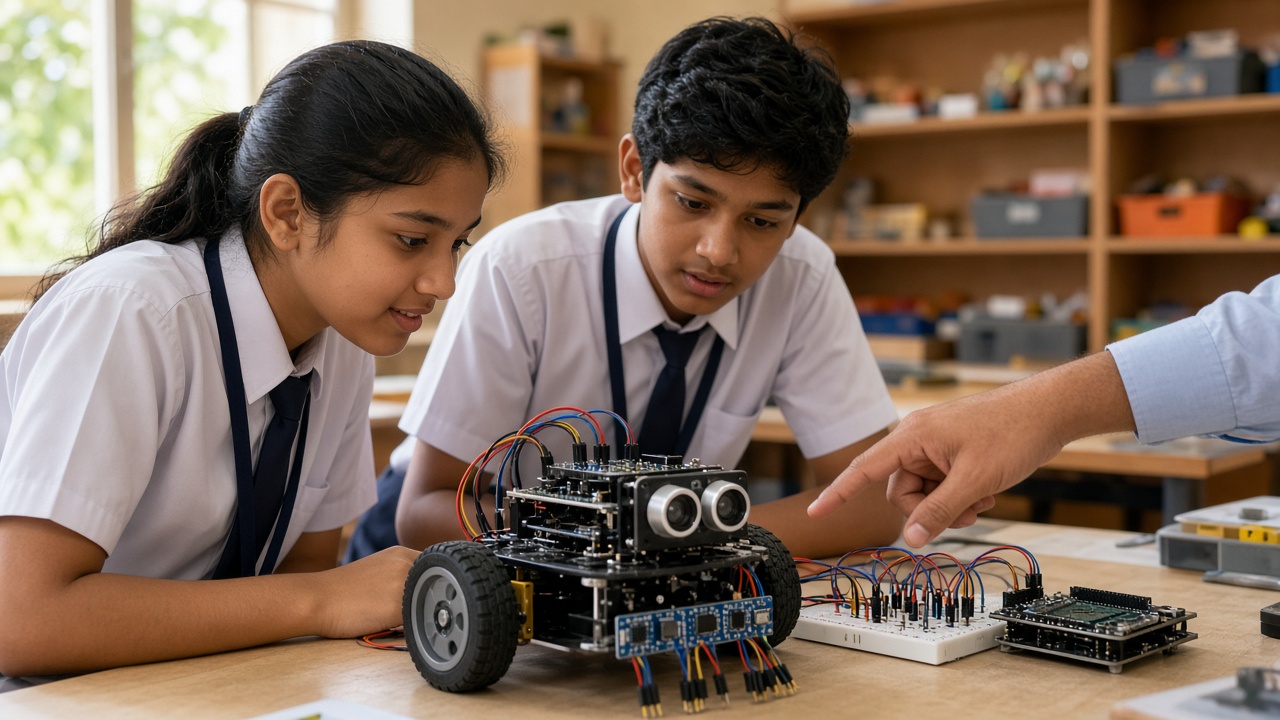
Distance, light, touch, sound and motion sensors explained simply for students, parents and teachers
A beginner-friendly guide to robot sensors for school students: what sensors measure, the sense-think-act loop, analog vs digital readings, common sensors, simple projects, safety tips and how sensor data powers AI.
Introduction
A robot without sensors is like a person walking with closed eyes and covered ears. It can move, but it has no idea what is around it. Sensors let a robot notice a wall, follow a line, feel a bump or react to a clap. This guide explains robot sensors simply for students from roughly Class 5 to Class 10, and for the parents and teachers who help them learn.
What is a sensor?
A sensor is a device that measures something in the real world and turns it into an electrical signal a computer can read.
You already use sensors every day. A phone screen rotates because a motion sensor notices you turned it. Your eyes, ears and skin are natural sensors, and your brain is the computer.
The sense-think-act loop
Almost every robot works in a repeating cycle called sense-think-act. First, sensors collect information. Next, the microcontroller, a tiny computer on the robot, runs code that decides what to do. Finally, actuators such as motors, buzzers or LEDs carry out the action.
For example, an obstacle-avoiding robot senses that a wall is 10 cm away, thinks "that is too close", and acts by stopping and turning. The loop repeats many times every second.
Analog and digital readings in plain words
Sensors give their answers in two main styles. A digital reading is like a light switch: only two answers, ON or OFF, 1 or 0. A push button is digital because it is either pressed or not pressed.
An analog reading is like a volume knob: it can be anywhere along a range. A light sensor might report a small number in a dark room and a large number in sunlight. On an Arduino Uno, analog pins turn this into a number from 0 to 1023, and the micro:bit's analog read gives a similar range. Your code then compares the number with a threshold, such as "if the light value is below 300, switch on the LED".
Common beginner sensors and what they measure
Ultrasonic distance sensor: It sends out a sound pulse too high-pitched for humans to hear and times how long the echo takes to bounce back. Because sound travels at a known speed in air, the board can calculate distance. The popular HC-SR04 module works this way.
IR (infrared) and line-following sensor: An IR light shines down, and a receiver measures how much bounces back. White or light surfaces reflect more, while black tape absorbs more, so the robot can tell whether it is on the line.
Light sensor (LDR): A light dependent resistor changes its resistance with brightness. Its resistance drops as light increases, which the board reads as a changing analog value.
Touch sensor or limit switch: A simple switch that closes when pressed. Robots use them as bumpers, and machines use limit switches to detect when a moving part reaches the end of its path.
Temperature and humidity sensor: Modules such as the DHT11 or DHT22 measure air temperature and moisture and send digital data, usually read with a ready-made code library.
Sound sensor: A small microphone module that detects loudness. Many offer an analog sound level and a digital output that triggers above a set level.
Gyroscope, accelerometer and IMU: An accelerometer senses movement and tilt, a gyroscope senses rotation, and an IMU (inertial measurement unit), such as the MPU-6050 module, combines them. Balancing robots and drones use them to stay steady. The micro:bit already has a built-in accelerometer.
Cameras: where sensors meet AI
A camera is a sensor too, but it collects far more data. Each image is a grid of thousands of tiny dots called pixels, and each pixel is stored as numbers for colour and brightness. A simple threshold rule cannot recognise a face or a fruit in all those numbers, so AI models trained on many example images are used to spot patterns.
How sensors connect to Arduino or micro:bit
Most beginner sensor modules have three or four pins: power (VCC or 3V/5V), ground (GND), and one or two signal pins.
On an Arduino, students usually connect sensors with jumper wires and a breadboard, then write code in the Arduino IDE or a block editor. On a micro:bit, crocodile clips or an expansion board connect to its pins, and code is written in MakeCode blocks, JavaScript or Python. Check that each sensor works at your board's voltage: the micro:bit uses 3V, while many Arduino boards use 5V.
Simple project ideas for each sensor
Ultrasonic: a parking assistant that beeps faster as an object gets closer.
IR: a line-following robot that tracks black tape on a white chart sheet.
LDR: an automatic night lamp that switches on when the room gets dark.
Touch switch: a bumper car robot that reverses and turns after hitting a wall.
Temperature and humidity: a classroom weather station that shows readings on a small display.
Sound: a clap-controlled light that toggles on and off.
IMU or accelerometer: a tilt-controlled game or a step counter on a micro:bit.
Safety and handling tips
Always disconnect power before changing wires. Never swap VCC and GND, because reversed power can damage a sensor instantly. Use only low-voltage batteries or USB power, and never connect projects to household mains electricity.
Handle modules by their edges, keep them dry and store small parts in labelled boxes. Younger students should work with an adult present, especially when soldering.
From sensor data to AI decisions
Simple robots follow fixed rules written by a programmer. AI-powered systems go further: they collect lots of sensor data, find patterns in it and use those patterns to make decisions. A self-driving car, for example, combines cameras and other sensors to understand the road.
When students log readings, look for patterns and write code that reacts to them, they practise the thinking behind AI. India's National Education Policy 2020 encourages hands-on, experiential learning, and sensor projects are one practical way to bring that into classrooms, though each school and board decides how it fits their curriculum.
Explore robot sensors with SheepByte
SheepByte is an AI and robotics education company based in Udaipur, Rajasthan. In our Robotics Lab program, students wire real sensors, write code and build robots that sense, think and act. We also run AI Learning, Coding Bootcamp, Drone Technology, Innovation Club and STEM Integration programs, offer workshops in Jaipur, Delhi and online, and help schools set up robotics labs.
If you want your students or child to start building with sensors, write to support@sheepbyte.com or visit sheepbyte.com.


