
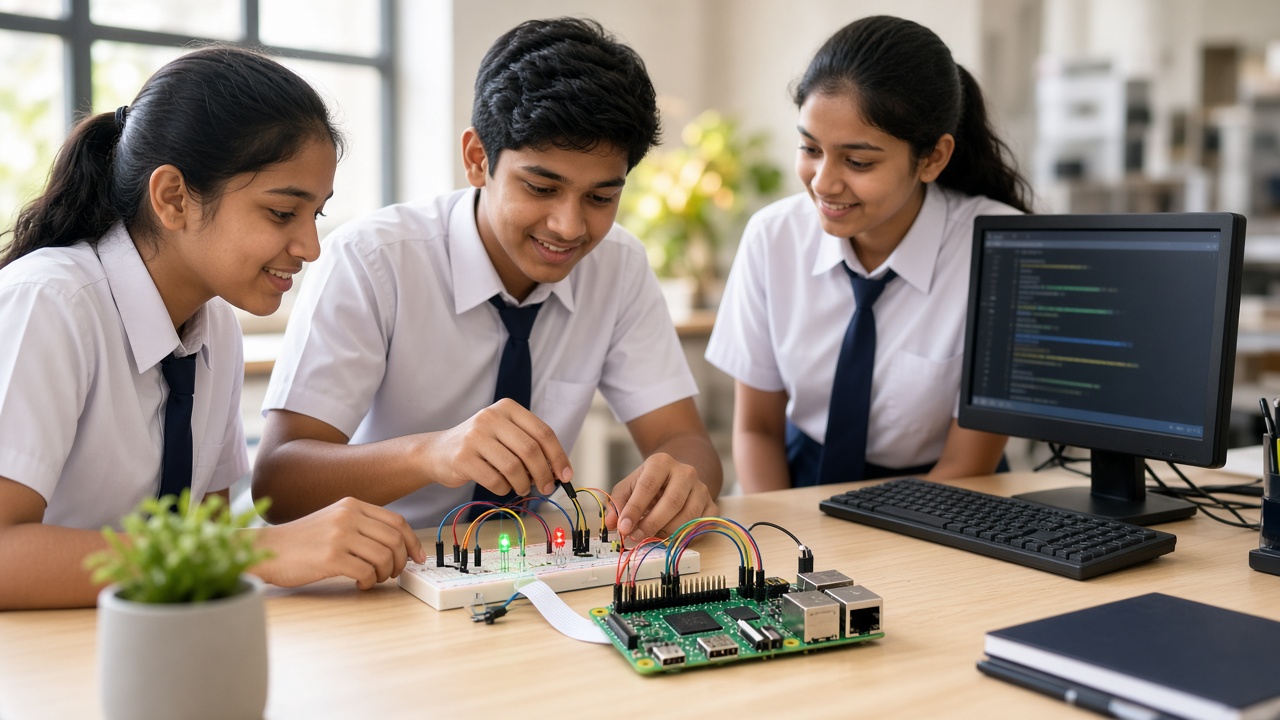
From a blinking LED to a mini robot: Raspberry Pi explained for students, parents and school leaders
A practical beginner's guide to Raspberry Pi for Indian schools: what a single-board computer is, how it differs from Arduino, what you need to start, GPIO pins in plain words, projects by class level, skills, safety, lab use and a checklist for teachers and principals.
Introduction
Many students in India use computers daily, but few make one control lights, sounds and motors. A Raspberry Pi changes that. It is a small, low-cost computer that students can set up, program and connect to simple electronics. This guide explains what a Raspberry Pi is, how it differs from Arduino, what you need to get started, GPIO pins in plain words, project ideas by class level, the skills students build, safety, and how schools can use it in labs and tinkering spaces.
What is a Raspberry Pi, in simple words?
A Raspberry Pi is a single-board computer: a complete computer built on one small circuit board. It has a processor, memory, USB ports, video output and, on most models, Wi-Fi. It was created in the UK to help young people learn computing.
Like a laptop, it runs a full operating system, usually Raspberry Pi OS, which is based on Linux. Students can browse, write documents and code in Scratch or Python on it.
Raspberry Pi vs Arduino: what is the difference?
An Arduino board is a microcontroller. It runs one program that you upload from another computer, and it is excellent for simple, reliable control of sensors and motors. A Raspberry Pi is a full computer that can run many programs at once, connect to the internet, use a camera and show a desktop on a screen.
Some projects use both together. Note that the Raspberry Pi Pico is a microcontroller board, closer to Arduino than to a full Raspberry Pi. For a detailed comparison of coding approaches, read our guide at sheepbyte.com/blog/python-vs-arduino-beginner-student.
What you need to get started
You need a Raspberry Pi board and a power supply that matches your model; the official supply is the safest choice. You also need a microSD card with Raspberry Pi OS installed, which you can prepare with the free Raspberry Pi Imager tool on another computer.
To use it, connect a monitor, keyboard and mouse, or set up remote access from a laptop on the same network. A case protects the board from dust, spills and accidental short circuits. For electronics projects, add a breadboard, jumper wires, LEDs, resistors, a push button and a buzzer.
GPIO pins explained simply
Along one edge of most Raspberry Pi boards is a row of metal pins called GPIO, short for General Purpose Input/Output. Your code can switch an output pin on or off to light an LED or sound a buzzer, or read an input pin to check whether a button is pressed or a sensor has changed.
Some pins provide power or ground, and the signal pins work at 3.3 volts. Students should always check a pin diagram before wiring, use a resistor with each LED, and never connect 5 volts or a motor directly to a GPIO pin. Beginners can control GPIO from Scratch with a GPIO extension or from Python with the gpiozero library.
Beginner projects by class level
Classes 4 to 6: Set up the Raspberry Pi, explore the desktop, and make an LED blink using Scratch. Then add a button that sounds a buzzer, or build a three-LED traffic light.
Classes 7 to 8: Move to Python with gpiozero. Build a reaction-time game with a button and LED, or a temperature and humidity station that reads a sensor and shows the values on screen or saves them to a file.
Classes 9 to 12: Try a simple camera project such as a time-lapse of a growing plant, a weather station that charts data over a week, or a mini robot with a motor driver board and a separate battery pack for the motors.
Skills students learn
Raspberry Pi projects build coding skills in Scratch and Python, and basic electronics such as circuits, voltage and resistors. Students also learn how a computer works: operating systems, files and networks.
They also practise problem-solving and patience. When an LED does not light, students check wiring, read error messages and test one step at a time. Pair work builds teamwork.
Safety first
Raspberry Pi projects use low voltages, but good habits matter. Always switch off and unplug the board before changing wires. Handle the board by its edges, keep it in a case, and keep water and metal objects such as clips away from it.
Never connect any project to mains power or household appliances; leave that to qualified electricians. Younger students should work with adult supervision. For camera projects, never record people without their permission, avoid filming in private spaces, and do not share images of students online without consent from parents and the school.
How schools can use Raspberry Pi in labs and tinkering spaces
Many schools use Raspberry Pi boards in computer labs, robotics labs and Atal Tinkering Labs (ATL) or similar tinkering spaces. A small set of boards shared between pairs is enough to start, and kits can be reused.
Link projects to subjects: a weather station for geography, data charts for maths, and a quiz box for languages. Equipment lists and guidelines for ATL and school boards change, so check the latest official guidelines before planning purchases.
A short checklist for teachers and principals
Try a simple LED project yourself before teaching. Check that each board has a matching power supply, a prepared microSD card, a case and a way to display or access it.
Set clear lab rules: power off before wiring, adult supervision for younger students, no mains connections, and permission before any photo or video.
Label kits, store components in boxes, start with short projects, and record what each student built and learned.
Frequently asked questions
Q: Does my child need coding experience? A: No. Students can start with Scratch and simple LED projects, then move to Python as they grow in confidence.
Q: Can a Raspberry Pi replace a school computer? A: For coding and simple tasks, it works well. For heavy software, a regular computer is better.
Q: Is Raspberry Pi better than Arduino? A: Neither is better for every project. Raspberry Pi suits projects that need a full computer; Arduino suits simple, dedicated control tasks.
Start Raspberry Pi projects with SheepByte
SheepByte is an AI and robotics education company based in Udaipur, Rajasthan. Our Robotics Lab and Coding Bootcamp programmes help students move from blinking LEDs to working robots, and our AI Learning, Drone Technology, Innovation Club and STEM Integration programmes connect coding with real-world projects. We run workshops in Jaipur, Delhi and online, and we help schools set up robotics labs.
If you want to bring hands-on Raspberry Pi projects to your school or child, write to support@sheepbyte.com or visit sheepbyte.com.


