
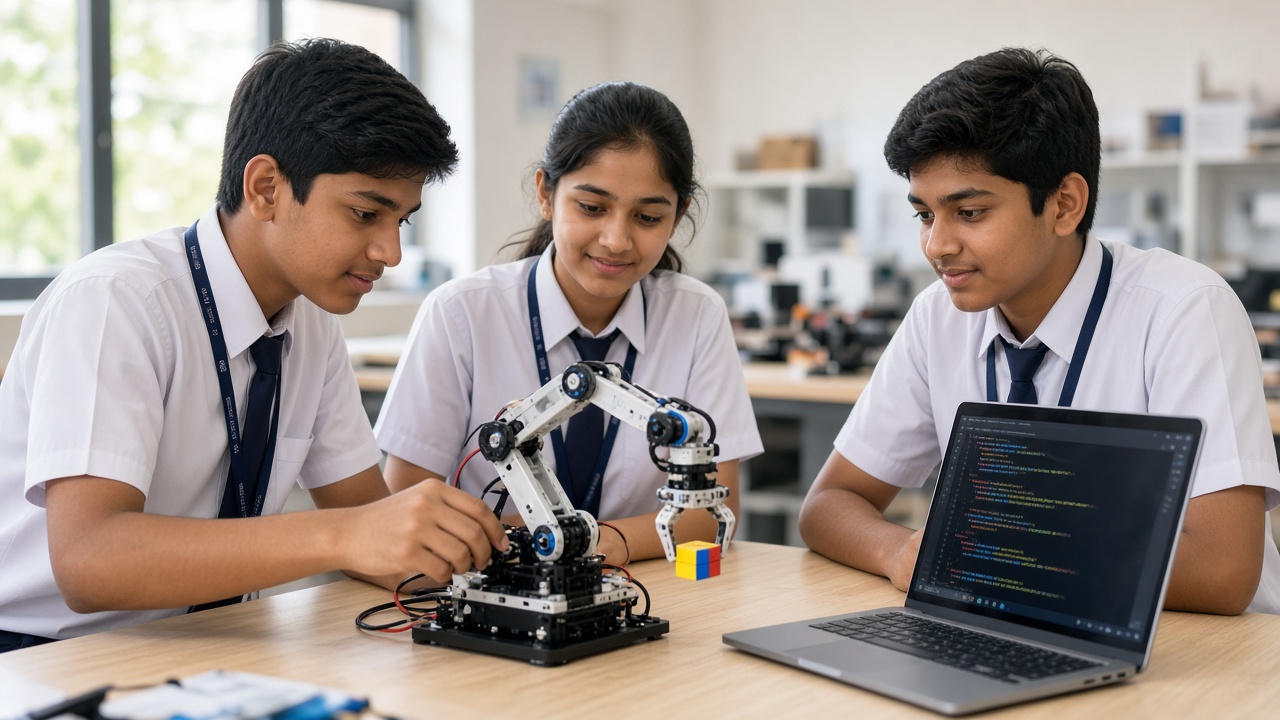
A few joints, some motors and a clever bit of code: a plain-language look at how a robot arm reaches, grabs and moves things, for students in Classes 6 to 12
A beginner-friendly guide to robotic arms for Indian school students, parents and teachers: what a robotic arm is and where it is used, links, joints and degrees of freedom, actuators such as servo motors, stepper motors and hydraulics, end effectors and grippers, sensors and feedback, the Arduino controller with a PCA9685 servo driver, programming with joint angles and record-and-playback, a gentle introduction to forward and inverse kinematics, a cardboard syringe arm and a 4-servo kit arm with a parts list, safety and fixes for servo jitter, power supply and overloading, and careers and exhibitions.
Introduction
Pick up a pen and your shoulder, elbow, wrist and fingers all work together without a thought. A robotic arm does the same job, but every movement must be planned, powered and checked. This guide explains how robotic arms work for students in Classes 6 to 12 and the parents and teachers helping them.
What is a robotic arm?
A robotic arm is a machine with linked parts and moving joints, a bit like a human arm, that can be programmed to pick up, move, hold or work on objects.
Factories use them to weld, paint and pack. In some hospitals, surgeons use robotic systems for small, steady movements, and arms fitted to spacecraft and space stations grab equipment. The basic ideas are ones you can try in a school lab.
Joints and degrees of freedom
The rigid pieces of an arm are called links, and the parts that bend or turn between them are joints.
Each independent way an arm can move is called a degree of freedom, or DOF. A simple school arm might have four: the base turns, the shoulder lifts, the elbow bends and the gripper opens and closes. Industrial arms often have six, so they can reach a point from many angles. More DOF means more flexibility, but also more motors and harder programming.
Actuators: the muscles
Actuators make the joints move. Most school arms use servo motors. A hobby servo has a motor, gears and a circuit inside, and it turns to the angle you ask for, such as 90 degrees, and holds there.
Stepper motors move in small, fixed steps, which suits precise, repeatable movement. Very large industrial arms that lift heavy loads may use hydraulics, where liquid pushed through pipes moves pistons with a lot of force.
End effectors and grippers
The tool at the end of the arm is called the end effector. It is the arm's hand. It might be a two-finger gripper, a suction cup for flat objects, a welding torch or a paint sprayer.
For school projects, a simple claw gripper driven by one servo is the usual choice. Foam blocks and bottle caps are good for practice.
Sensors and feedback
An arm moving blindly can miss its target or crush what it holds. A servo already has feedback built in, because it checks and corrects its own position. Bigger arms use encoders to measure exact joint angles.
An IR or ultrasonic sensor can detect an object in front, a limit switch stops a joint going too far, and a touch sensor can tell the gripper to stop squeezing. More in our guide at sheepbyte.com/blog/robot-sensors-beginners-guide-school-students.
The controller: the brain
An Arduino Uno or Nano is a popular controller for school arms. One or two servos can connect straight to it, but for four or more a servo driver board such as the PCA9685 makes life easier. It can control up to 16 servos using just two signal wires (I2C), and it takes servo power from a separate supply.
How a robotic arm is programmed
The simplest method is to give each joint an angle. You might write: base to 90 degrees, shoulder to 60, elbow to 120, then close the gripper. Play a list of these poses in order and you have a pick-and-place routine.
Many arms also support teach mode, or record and playback. You move the arm by hand or with knobs, it records the joint positions, and then it repeats the movement.
Later you will meet forward and inverse kinematics. Forward kinematics asks: if I set these joint angles, where will the gripper end up? Inverse kinematics asks the reverse: I want the gripper here, so what angles do I need? The second is harder and uses trigonometry, a great challenge for older students.
A simple school build
Beginners can start with a cardboard hydraulic arm. Cut links from thick cardboard, join them with paper fasteners, and connect pairs of syringes with water-filled tubes. Push one syringe and the other moves a joint, which shows hydraulics clearly.
The next step is a 4-servo kit arm. A basic parts list: an acrylic or 3D-printed arm kit with a claw, four servos such as the SG90 or MG90S, an Arduino Uno or Nano with a USB cable, a PCA9685 servo driver, a separate 5 to 6 volt power supply that can give enough current for all the servos, jumper wires, and potentiometers or a joystick module if you want manual control. Check your servo datasheet first.
Safety and common problems
Servo jitter: shaking servos usually mean weak or noisy power. Give them their own supply, connect its ground to the Arduino ground, and keep wires firm.
Power supply: never run several servos from the Arduino's 5V pin or a laptop's USB port. The current draw can reset or damage the board.
Overloading: small plastic-gear servos strip their gears if the arm lifts something too heavy or is pushed against a hard stop. Keep loads light and set safe angle limits in your code.
Safety: keep fingers away from the gripper and joints while the arm runs, switch off power before adjusting it, and have an adult supervise younger students.
Careers and exhibitions
Robotic arms connect to careers in mechatronics, electronics and mechanical engineering, industrial automation and medical technology. A working arm makes a strong exhibition or tech fest project because visitors can watch it pick and place. If you have built a line follower (see sheepbyte.com/blog/how-line-follower-robot-works-guide-school-students-india), an arm is a natural next step. Event rules differ, so check the official guidelines.
Frequently asked questions
Q: Do I need coding to build a robotic arm? A: No. A syringe hydraulic arm needs no electronics at all, but servo arms need a short Arduino program, which is a good way to start coding.
Q: Is a robotic arm project suitable for my class? A: Students in Classes 6 to 8 can usually build a cardboard hydraulic arm with guidance, while older students can try servo kits, record-and-playback and simple kinematics.
Build robotic arms with SheepByte
SheepByte is an AI and robotics education company based in Udaipur, Rajasthan, working with schools and students. Our programmes include AI Learning, Coding Bootcamp, Drone Technology, Innovation Club, Robotics Lab and STEM Integration, all built around making real projects. We also set up robotics labs in schools and run workshops in Jaipur, Delhi and online.
To bring hands-on robotics, including projects like robotic arms, to your school or help your child get started, write to contact@sheepbyte.com or call or WhatsApp +91 75975 60225.


