
Wheels that spin, arms that lift and 3D printers that move with precision: a plain-language look at the motors that make robots move, for students in Classes 6 to 12
A beginner-friendly guide to robot motors for Indian school students, parents and teachers: what a motor or actuator is, the basic idea of electromagnetism in plain words, how DC motors and gear motors drive wheels, how servo motors such as SG90-style hobby servos turn to a set angle, how stepper motors move in small steps in 3D printers, why a microcontroller needs a motor driver such as an L298N or L293D and a separate power supply, how to choose a motor for wheels, arms or precise positioning, simple first projects, safety tips, a motor sorting classroom activity and FAQs.
Introduction
A robot car rolls forward, a robotic arm lifts a block and a 3D printer builds a model. Sensors help a robot notice the world and a microcontroller decides what to do, but motors are what actually make things move. This guide is for students in Classes 6 to 12 and the parents and teachers helping them.
What is a motor, and what is an actuator?
A motor is a device that turns electrical energy into movement, usually a spinning motion. In robotics, any part that creates movement is called an actuator, and electric motors are the most common actuators in school projects.
If sensors are a robot's senses and the microcontroller is its brain, actuators are its muscles. Our guides at sheepbyte.com/blog/robot-sensors-beginners-guide-school-students and sheepbyte.com/blog/what-is-a-microcontroller-guide-school-students-india explain the other two parts.
The big idea: electricity and magnets
When electric current flows through a coil of wire, the coil behaves like a magnet. This is called electromagnetism.
Magnets pull on opposite poles and push away similar poles. Inside a motor, coils of wire sit near permanent magnets. As current flows, the coils are pushed and pulled, and the shaft turns. Switching which coils get current at the right moment keeps it spinning.
DC motors and gear motors
A simple DC motor spins whenever you connect it to a battery. Swap the two wires and it spins the other way.
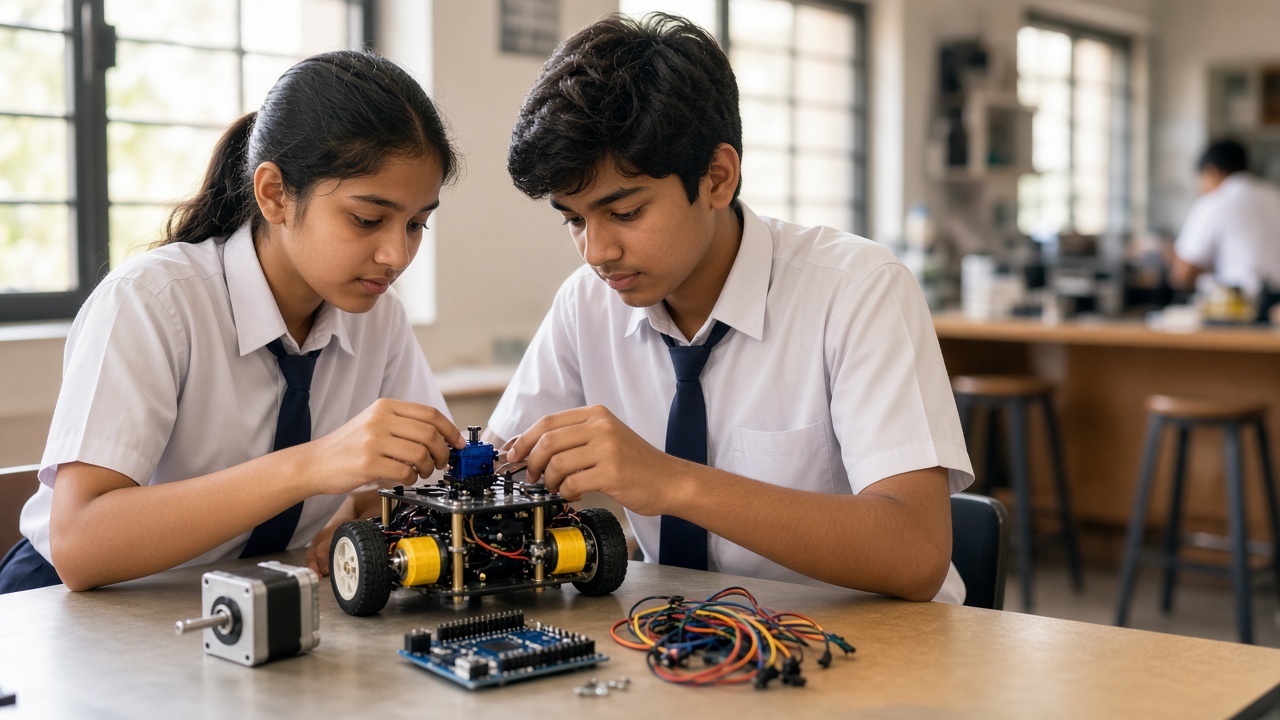
Small DC motors spin very fast but have little turning force, called torque. That is why robots usually use gear motors: a DC motor joined to a gearbox. The gears trade speed for torque, so the wheel turns more slowly but with enough force to move the robot. The yellow plastic gear motors in many Indian robot car kits are an example.
DC motors are great for wheels, but on their own they do not know how far they have turned.
Servo motors: turning to an exact angle
A servo motor contains a small DC motor, a set of gears, a position sensor and a control circuit, all in one box. It turns to the angle you ask for and holds it.
Small hobby servos like the SG90 are common in school kits. A typical hobby servo turns through roughly 180 degrees and has three wires: power, ground and signal. The microcontroller sends a repeating pulse on the signal wire, and the length of each pulse tells the servo which angle to move to. Arduino's Servo library handles this.
Servos suit robotic arms, grippers and steering. Special continuous rotation servos spin like wheel motors instead.
Stepper motors: moving in small steps
A stepper motor turns in small, equal steps. Its coils are switched on in a set order, and each switch moves the shaft by one step. Many common steppers take 200 steps for one full turn, which is 1.8 degrees per step.
Because the controller counts steps, it knows the position without a sensor, as long as the motor is not overloaded and does not skip steps. This is why 3D printers and CNC machines use stepper motors.
Why a microcontroller needs a motor driver and separate power
A microcontroller pin can only supply a tiny current, enough for an LED but far too little for a motor.
A motor driver acts like a set of electronic switches. The microcontroller sends small control signals, and the driver passes much larger current from a battery to the motor. Driver chips and modules such as the L293D and L298N contain a circuit called an H-bridge, which lets the program change a DC motor's direction and, using a signal called PWM, its speed.
Motors also need their own battery pack, because they draw bursts of current that can make the board reset. Connect the ground of the battery and the microcontroller together so the signals share a common reference. Voltage and current are explained at sheepbyte.com/blog/basic-electronics-for-school-students-guide-india.
Choosing a motor for your project
Wheels and continuous movement: use DC gear motors with a motor driver.
Arms, grippers and pointing to an angle: use servo motors.
Precise, repeatable positioning, such as moving a pen plotter: use stepper motors with a stepper driver.
Also check the voltage rating and the torque needed for the weight you are moving.
Simple first projects
Servo pointer: make a servo sweep from 0 to 180 degrees, then control it with a potentiometer knob.
Two-wheel robot car: drive two gear motors through an L298N or L293D driver. Add sensors later to build a line follower, explained at sheepbyte.com/blog/how-line-follower-robot-works-guide-school-students-india.
Stepper clock hand: make a stepper move one step at a time and count how many steps make a full circle.
Safety tips with motors
Use only low-voltage batteries recommended for your kit, and never connect a project to mains power.
Switch off or unplug power before changing wires. Keep fingers, hair and loose sleeves away from spinning wheels and gears.
Drivers and motors can get hot; stop if anything smells of burning. Handle lithium batteries with care, and work with an adult or teacher nearby.
Classroom activity: motor sorting challenge
Write tasks on cards, such as drive a robot car, open a toy door to 90 degrees and move a 3D printer nozzle. In small groups, students decide whether each task needs a DC gear motor, a servo or a stepper, and explain why. If kits are available, finish by demonstrating each motor type.
Frequently asked questions
Q: Which motor should a beginner start with? A: A hobby servo is the easiest to control from a microcontroller, while DC gear motors with a driver are the usual first step for robot cars.
Q: Can I reuse motors from old toys? A: Often, yes. Toy car motors suit experiments, but never open devices that plug into the mains.
Q: Are motors and robotics part of the school syllabus? A: India's National Education Policy 2020 encourages hands-on, experiential learning, and many schools run robotics and tinkering activities. What is covered varies by board and school, so check with your school or the official board website for current information.
Build real projects with SheepByte
SheepByte is an AI and robotics education company based in Udaipur, Rajasthan, working with schools and students. Our programmes include AI Learning, Coding Bootcamp, Drone Technology, Innovation Club, Robotics Lab and STEM Integration, all built around making real projects. We also set up robotics labs in schools and run workshops in Jaipur, Delhi and online.
To bring hands-on motor and robotics projects to your school or help your child build their first moving robot, write to contact@sheepbyte.com or call or WhatsApp +91 75975 60225.


