
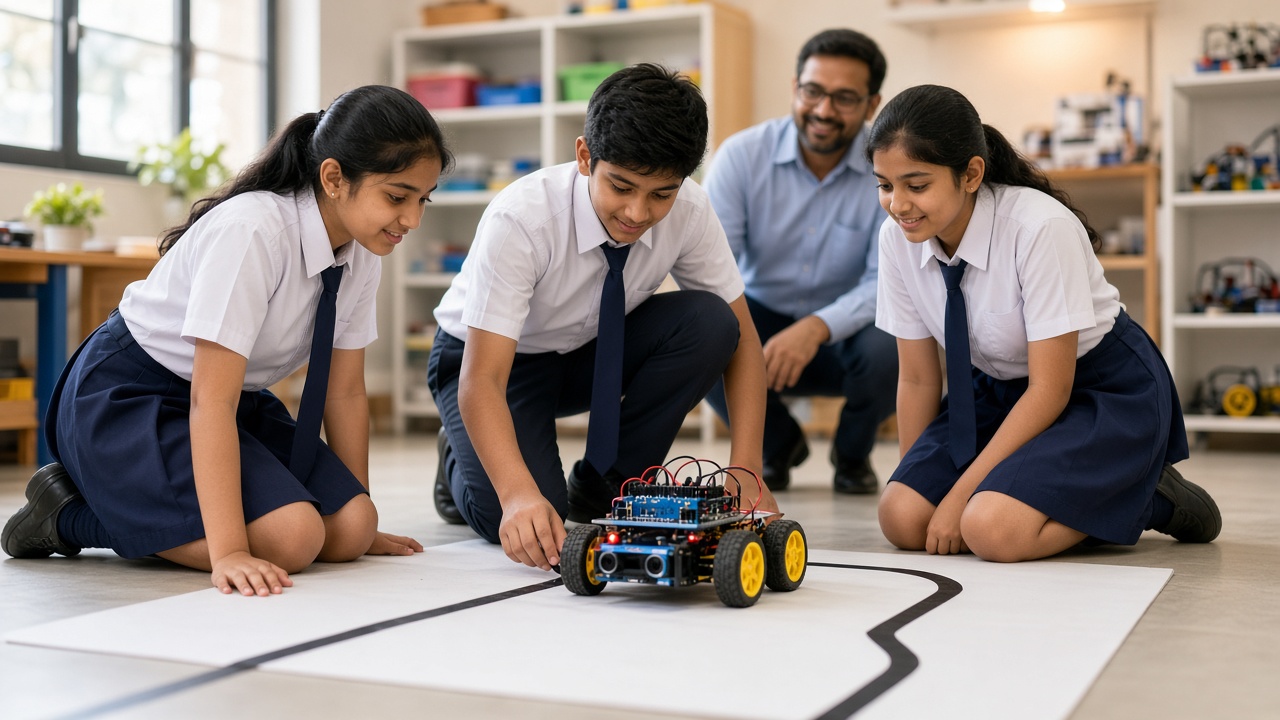
A strip of black tape, a few sensors and some simple logic: a plain-language look at how a robot follows a line on its own, for students in Classes 6 to 12
A beginner-friendly guide to line follower robots for Indian school students, parents and teachers: what a line follower is, how IR sensors with an emitter and receiver tell a black line from a white surface, how many sensors to use and why, the Arduino controller, motor driver and DC motors, differential steering with simple if-else logic, a gentle introduction to smoother PID-style control, a basic parts list, common problems and fixes for lighting, sensor height, calibration and the track, and how line followers fit into competitions and exhibitions.
Introduction
Stick black tape on a white floor, switch on a small robot, and watch it trace the line, curves and all, with nobody steering. That is a line follower, one of the best first robotics projects for students in Classes 6 to 12. This guide explains how it works for students and the parents and teachers helping them.
What is a line follower robot?
A line follower is a small wheeled robot that follows a path on the ground, usually a black line on a white surface. It keeps checking where the line is and corrects its direction many times a second.
Some warehouses use the same idea for carts. For students, it teaches sensing, decisions and motor control in one project.
How IR sensors see the line
Most school line followers use infrared (IR) sensors. Each has an emitter, a small LED giving out infrared light we cannot see, and a receiver that measures how much of that light bounces back.
White surfaces reflect most of the infrared light, so the receiver gets a strong signal. Black surfaces absorb most of it, so little comes back. Some modules give an on/off signal and others a range of values, and some read HIGH on black while others read LOW, so test yours first.
How many sensors, and why?
One sensor can work, but the robot wobbles along the line's edge. Two sensors, one on each side of the line, are the classic beginner setup: if the left one sees black, the robot has drifted right, and the other way round.
A centre sensor shows when the robot is right on track. Advanced robots use a row of five or more, called a sensor array, which helps with sharp turns and faster runs. For a first build, two or three is plenty.
The brain, the motor driver and the motors
The controller is the brain. An Arduino Uno or Nano is a common school choice because it is easy to program. It reads the sensors, decides what to do and tells the motors how to move.
An Arduino pin cannot power a motor directly, so a motor driver, such as a board based on the L298N or L293D, sits in between. It takes the Arduino's small signals and switches battery current to the motors, and can reverse them or control speed using PWM (pulse width modulation).
Most beginner robots use two geared DC motors, one per wheel, plus a caster wheel for balance.
Steering with simple if-else logic
The robot turns using differential steering: the two wheels run at different speeds. If the left wheel slows while the right keeps going, the robot turns left.
With two sensors, the program is a few if-else rules. If both see white, the line is between them, so go straight. If the left sees black, turn left. If the right sees black, turn right. If both see black, you may be at a crossing or the finish, so stop or follow a rule you choose. The Arduino repeats this check in a loop.
Smoother driving with PID-style control
The if-else method works, but the robot often zigzags because every correction is the same size, whether it is slightly or badly off. PID control corrects more smartly.
The robot first works out an error: how far, and which way, it is from the line's centre. The P part (proportional) turns gently for a small error and harder for a big one. The D part (derivative) watches how fast the error changes and stops the robot overshooting. The I part (integral) fixes small errors that build up, and many line followers barely use it.
No heavy maths needed: start with only P, adjust one number until the robot runs smoothly, then add a little D. Trial and error is normal.
A simple parts list for your first build
A basic build needs:
A chassis with two geared DC motors, wheels and a caster wheel. Two or three IR sensor modules. An Arduino Uno or Nano with a USB cable. A motor driver board. A battery pack that suits your motors and driver, with a switch. Jumper wires, a small screwdriver and double-sided tape. For the track, a white chart sheet and black electrical tape.
Many robotics kits include most of these. To learn more about IR and other sensors, read sheepbyte.com/blog/robot-sensors-beginners-guide-school-students.
Common problems and how to fix them
Lighting: sunlight and some lamps give off infrared that confuses the sensors. Test in steady indoor light or shield the sensors.
Sensor height: too high and readings become weak; too low and they scrape the track. A gap of a few millimetres usually works, but check your module's guidance.
Calibration: many modules have a small potentiometer. Hold the sensor over white, then black, and turn it until the indicator LED switches cleanly. For analog readings, print values on the Serial Monitor and pick a threshold in between.
Track and speed: shiny tape, wrinkled paper and sharp corners cause trouble. Use matte tape, keep curves gentle and slow the motors until the robot runs reliably, then speed up gradually. Loose wires or a weak battery are often the real culprit.
Competitions and exhibitions
Line follower races often appear at school tech fests, inter-school robotics events and college festivals in India. Rules on robot size, track design and kits vary between events, so read the official rule book for the one you enter.
It also makes a good exhibition project, since visitors can see the sensors at work. For more ideas, see sheepbyte.com/blog/beginner-robotics-project-ideas-for-students.
Frequently asked questions
Q: Can I build a line follower robot without coding? A: Yes, simple versions use sensors, comparator chips and a motor driver without a microcontroller, but an Arduino lets you change the behaviour and learn programming.
Q: What age is right to start a line follower project? A: Many students in Classes 6 to 8 can build one with an adult's guidance, and older students can try sensor arrays and PID tuning.
Build robots with SheepByte
SheepByte is an AI and robotics education company based in Udaipur, Rajasthan, working with schools and students. Our programmes include AI Learning, Coding Bootcamp, Drone Technology, Innovation Club, Robotics Lab and STEM Integration, all built around making real projects. We also set up robotics labs in schools and run workshops in Jaipur, Delhi and online.
To bring hands-on robotics, including projects like line followers, to your school or help your child get started, write to contact@sheepbyte.com or call or WhatsApp +91 75975 60225.


