From UPI posters to school tickets, those black-and-white squares hide a short digital message: a plain-language look at how QR codes work, for students in Classes 6 to 12
A beginner-friendly guide to QR codes for Indian school students, parents and teachers: what a QR code is, how finder patterns and modules are built, what data a code can hold, how phones decode them with error correction, how QR codes differ from barcodes, everyday uses in India such as UPI and school links, safety tips, a classroom QR activity and FAQs.
Introduction
You have almost certainly scanned a QR code: to pay with UPI at a shop, open a ticket, join Wi-Fi or check in at school. Those black-and-white squares look mysterious, but they simply store a short message a phone camera can read in a second. This guide explains how QR codes work for students in Classes 6 to 12 and the parents and teachers helping them.
What is a QR code?
A QR code is a square pattern of black and white modules that stores digital information a camera can scan and decode. QR stands for Quick Response. It was designed so machines could read data faster and from more angles than older one-line barcodes.
A QR code can hold a website link, short text, payment details, Wi-Fi settings or contact information. Once your phone understands the pattern, it can open a page, app or payment screen without you typing.
How a QR code is built
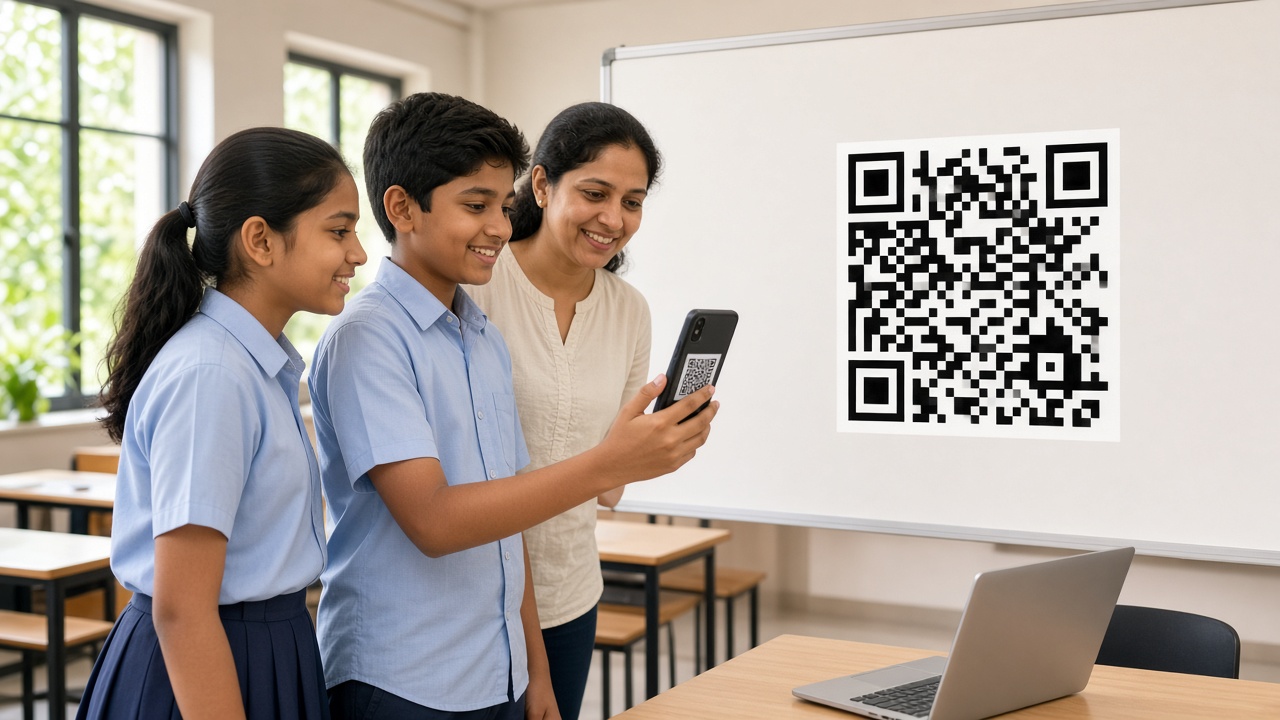
Look closely and you will see three large squares in the corners. These finder patterns help the phone work out where the code is, which way it faces and how large it is, even at an angle.
The rest of the square is filled with smaller black and white squares called modules. They encode the data plus extra bits for checking and repairing errors. A quiet zone, the blank white border around the code, keeps it separate from other printing so the camera can find the edges cleanly. Alignment and timing patterns help when the print is slightly bent or photographed from the side.
What data can a QR code hold
Common contents include a URL, plain text, a phone number, email address, contact card, Wi-Fi name and password, or payment information used by apps such as UPI.
Capacity depends on the code version, how dense the modules are and how much space is reserved for error correction. Everyday codes are usually meant for short links or payment details, not long documents. Longer data generally means a denser square.
Behind the scenes the information is still binary: patterns of 0s and 1s. For a refresher, read sheepbyte.com/blog/what-is-binary-code-guide-school-students-india.
How phones read QR codes
Your phone camera captures an image of the square. Software then finds the corner patterns, maps the grid of modules and turns the black and white pattern back into numbers and text. That step is called decoding.
QR codes use error correction: extra data so the phone can often still read a code that is smudged, partly covered or a little faded. More protection leaves less room for the message but raises the chance of a successful scan.
Related ideas about how computers make sense of images are in sheepbyte.com/blog/what-is-computer-vision-explained-school-students.
QR codes vs barcodes
A traditional barcode is usually a set of vertical lines that store a small amount of data, often a product number, and is scanned in one direction.
A QR code is two-dimensional: data sits across a grid, not only in a single line. That design generally allows more data, scanning from more angles and useful error correction. Shops may still use line barcodes on products while using QR codes for payments, menus, tickets and learning links.
Everyday uses in India
In India you will meet QR codes on UPI payment posters, event and travel tickets, school ID cards, notice boards and worksheets that open a form, video or class resource. Museums and classrooms may place a code beside an exhibit so learners can open related material on their phones.
Because a code can point to a webpage, it also connects to how the internet delivers that page once the link opens. See sheepbyte.com/blog/how-does-the-internet-work-guide-school-students-india.
Safety tips for students
A QR code only carries data. The risk is what your phone does next. Treat unknown codes like unknown links.
Do not scan random stickers unless a trusted adult or teacher asks you to. After scanning, read the URL or prompt carefully before you tap Open, Pay or Connect. Avoid entering passwords on a site from a surprise scan. If a payment code looks altered or covered by another sticker, stop and ask before paying.
Classroom activity: make a class QR code
Ask your teacher for a school-approved link such as class notes, a practice quiz or the school website. Using a trusted generator the school allows, create a code, print it and place it on the board or a worksheet.
Try scanning from different distances and angles, cover a small corner to see whether it still works, discuss why error correction helps, and write one sentence on what data the code holds versus what happens after the link opens. This builds computational thinking: representing information, testing a system and noticing failure cases.
India's National Education Policy 2020 encourages coding and computational thinking, though what is taught varies by board, class and school. A QR project can fit as a short digital-literacy activity when teachers choose safe tools and links.
Frequently asked questions
Q: Who invented QR codes? A: QR codes were created in the 1990s by a team at the Japanese company Denso Wave for tracking parts in manufacturing. The format later spread to tickets, payments and education as camera phones became common.
Q: Do I need a special app to scan a QR code? A: Many modern smartphones can scan with the built-in camera app. Some phones or older models may need a scanner from an official app store. Follow your school's rules about which apps are allowed.
Q: Can a damaged QR code still work? A: Often yes, within limits. Error correction can help when part of the code is dirty or blocked. If too much is missing, or glare and blur hide the modules, the scan fails and you need a clearer print or better lighting.
Learn with SheepByte
SheepByte is an AI and robotics education company based in Udaipur, Rajasthan, working with schools and students. Our programmes include AI Learning, Coding Bootcamp, Drone Technology, Innovation Club, Robotics Lab and STEM Integration, all built around making real projects. We also set up robotics labs in schools and run workshops in Jaipur, Delhi and online.
To bring hands-on coding and robotics learning to your school or help your child take their first steps in technology, write to contact@sheepbyte.com or call or WhatsApp +91 75975 60225.