
From battery and LED to robots and IoT: basic electronics explained for students, parents and school leaders
A practical beginner's guide to basic electronics for Indian schools: current, voltage and resistance in plain words, common components, reading simple circuits, safe class projects, and a checklist for teachers and principals.
Introduction
Basic electronics teaches students how a battery, a switch and a lamp work together long before they open a coding app. For Indian schools it connects science class to making and robotics. This guide explains current, voltage and resistance in plain words, names common beginner-kit parts, shows how to read a simple circuit, suggests safe first projects by class level, and lists safety rules plus a short checklist for teachers and principals.
Current, voltage and resistance in plain words
Think of a simple water pipe. Voltage is like the push or pressure that moves the water. Current is how much water flows through the pipe. Resistance is how narrow or rough the pipe is, which makes flow harder. In a circuit the 'water' is electric charge, and the 'pipe' is the path through wires and components.
A higher voltage battery can push harder. Lower resistance lets more current flow if the rest of the circuit allows it. Students do not need formulas on day one. They need the idea that too much current can heat a wire or burn out an LED, and that a resistor is often added to limit that flow.
Common components on a school kit
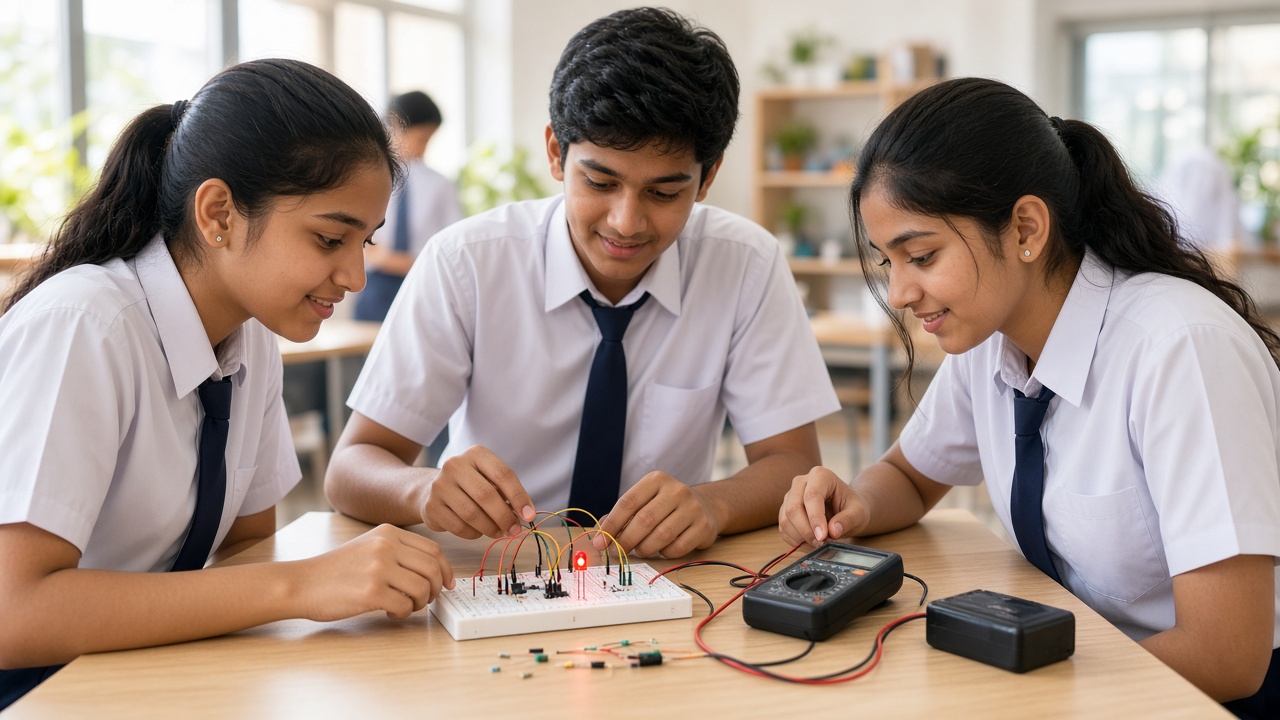
A battery or battery pack supplies a safe, low voltage for classroom circuits. An LED lights when current flows through it in the correct direction; it usually needs a resistor so it is not damaged. A resistor limits current. A switch opens or closes the path so students can turn a circuit on and off.
A buzzer makes sound when powered. A breadboard lets students press jumper wires and parts into holes without soldering, so circuits can be built and changed quickly. Jumper wires connect points on the board. A small DC motor turns when powered and is a first step toward wheels and robots. Teachers should label polarity for batteries and LEDs.
How to read a simple circuit
A circuit needs a closed loop: energy source, a path, and at least one useful part such as an LED or motor. On paper, symbols stand for each part; in class, a labelled diagram next to the breadboard helps students match drawing to real wires.
Trace the path with a finger: from the battery positive side, through the switch, through the resistor and LED, and back to the negative side. If the loop is broken, nothing works. If two wires connect the battery terminals with almost no resistance, that is a short circuit and can overheat the battery. Spotting a complete, safe path is the core skill before any advanced kit.
Safe first projects by class level
Classes 3 to 5: Battery, switch and LED on a breadboard; then add a buzzer on a second simple loop. Focus on naming parts, following a diagram and turning the switch off when finished.
Classes 6 to 8: LED brightness with different resistors, a two-switch idea such as needing both switches on, and a small motor with a switch. Students can sketch, build, test and fix one mistake at a time.
Classes 9 to 12: Combine sensor ideas from a robotics kit where available, drive a motor for a simple rolling chassis, and document a short project report. Across ages, start with one loop that works. A glowing LED teaches more than a crowded board that fails.
Safety rules every school session should follow
Use only low-voltage batteries or approved classroom packs. Never connect student circuits to mains wall power. Avoid shorting battery terminals with bare wires or metal tools, and stop if a battery, wire or motor feels hot.
Do not leave damaged or leaking batteries in the kit. Keep liquids away from the table. Adult supervision is essential for younger students and strongly advisable for all sessions. Teach students to disconnect power before rearranging wires, and to report anything that smells burnt or looks wrong.
How electronics leads into robotics, Arduino and IoT
Once students can light an LED and run a motor safely, robotics kits make sense: sensors, wheels and controllers are electronics plus structure and code. Arduino-class boards read inputs and control outputs; beginners still rely on voltage, current and clear wiring.
IoT projects connect a circuit to the internet so data or alerts can travel further, but schools should follow their own network and safety policies and check the latest official guidelines where schemes apply. SheepByte's Robotics Lab, Innovation Club and STEM Integration programmes build on this foundation, and SheepByte helps schools set up robotics labs where electronics kits sit beside sensors and controllers.
A short checklist for teachers and principals
Name a teacher or lab coordinator for the electronics kit, with a simple booking and inventory sheet. Store batteries separately when not in use, discard damaged cells safely, and keep spare LEDs, resistors and jumper wires labelled.
Train staff on polarity, short-circuit risks and how to stop a hot circuit. Set written student rules: low-voltage only, no mains, no unsupervised use for younger classes, and power off before changing wires.
Link activities to science topics such as circuits and energy, and to robotics or innovation-club goals. If your school explores scheme-linked labs such as Atal Tinkering Labs, check the latest official guidelines. Plan time for tidy-up, and decide how project notes are shared with parents.
Frequently asked questions
Q: Do students need to know coding before basic electronics? A: No. Wiring a battery, switch and LED comes first. Coding helps later when students use boards such as Arduino to control the same parts with programs.
Q: Are coin cells and AA batteries safe for class? A: Low-voltage battery packs designed for classroom kits are the usual choice under adult supervision. Avoid mains power, watch for heat, and follow your school's lab rules for storage and disposal.
Q: How does this help with board exams or STEM marks? A: Basic circuits often appear in science class, but the deeper gain is careful observation, following diagrams and fixing errors. Pair each build with a clear learning goal rather than treating it as only a hobby.
Build electronics confidence into your school's STEM journey with SheepByte
SheepByte is an AI and robotics education company based in Udaipur, Rajasthan. Our Robotics Lab, Innovation Club and STEM Integration programmes help students design, build and connect ideas. We also offer AI Learning, Coding Bootcamp and Drone Technology programmes, plus workshops in Jaipur, Delhi and online, and we help schools set up robotics labs.
If you want to explore robotics labs, innovation clubs or STEM integration for your school or child, write to support@sheepbyte.com or visit sheepbyte.com.


